
The Pomodoro Technique is a focus method: you work on a single task for 25 minutes, rest for 5, and take a longer break every four rounds. Francesco Cirillo came up with it in the late 1980s using a tomato-shaped kitchen timer, and pomodoro is Italian for tomato.
It is simple and it works, but it has an enemy that did not exist in the 80s: your phone. Here is how to do it properly, and how to stop a notification from stealing your pomodoro.
How it works, in 4 steps
- Pick one task. Something specific, like "draft the report", not "work".
- Set a timer for 25 minutes and work only on that until it rings. If something else comes to mind, write it down and carry on.
- Rest for 5 minutes. Stand up, drink some water, look out of the window. It is not phone time.
- Every 4 pomodoros, take a longer break: 15 to 30 minutes.
Why it works
- 25 minutes is not scary. Starting something that lasts an hour is hard; starting something that lasts 25 minutes is much easier.
- The timer gives you permission to ignore everything else. Whatever comes up can wait for the break.
- Breaks stop you from burning out, so you come back to the task with a fresher head.
The problem: your phone in the middle of a pomodoro
You have been focused for ten minutes, your phone buzzes and, "just for a second", you open Instagram. By the time you come back, fifteen minutes have gone and the pomodoro is broken. A normal timer cannot prevent that: it only counts time. What prevents it is making distracting apps impossible to open while the pomodoro runs.
How to do Pomodoro on Android with your apps blocked
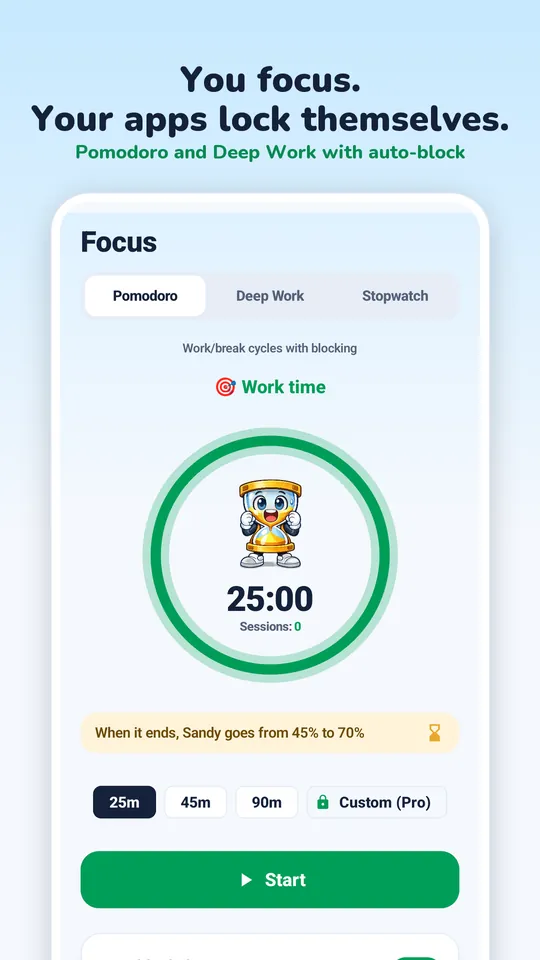
Stop Wasting Time, our app, has a Pomodoro timer that blocks your apps while you work:
- Install Stop Wasting Time from Google Play. It is free.
- In the Block tab, add the apps that distract you.
- Go to Focus → Pomodoro and choose a length: 25, 45 or 90 minutes.
- Leave "Auto-block distractions" on. If you like, pick a focus sound: white noise, rain or lo-fi.
- Tap Start. If you try to open a blocked app during the pomodoro, Sandy stops you. When it ends, your break starts, and every four pomodoros you get a long 15-minute one.
What is free and what is Pro?
- Free: 25, 45 or 90-minute pomodoros with automatic breaks, app blocking while you focus, and the focus sounds.
- Pro: custom work and break lengths, plus strict mode, which makes blocked apps impossible to open until the time is up. You can try it free for 7 days.
25 minutes? Fit the pomodoro to your task
25 minutes is a starting point, not a rule. For deep work such as coding, writing or studying, many people do better with 45 or even 90-minute blocks. Try a few lengths for a week and keep the one that lets you finish the most without wearing you out. For truly long blocks, the app also has a single-session Deep Work mode with Do Not Disturb.
Common mistakes
- Spending the break on your phone. Five minutes of social media is not rest: you come back with your head somewhere else.
- Skipping breaks. It feels productive, but you pay for it by the third hour.
- Mixing tasks in one pomodoro. One pomodoro, one task.
Frequently asked questions
What should I do during the break?
Anything that is not a screen: stand up, stretch, drink water, look into the distance.
How many pomodoros a day?
It depends on your work. Six to ten is an intense day; if you are just starting, three or four done well already make a difference.
Is the app free?
Yes. Pomodoro with app blocking is free. Pro adds custom lengths and strict mode.
Is it always the same app that distracts you? See how to block apps on Android.

Do your first distraction-free Pomodoro
Stop Wasting Time has a Pomodoro timer that blocks your apps while you work, with focus sounds. Free.
Get it free on Google Play